
 Introduction
Online shopping is the activity of purchasing goods and services on the Internet. Online shopping transactions are typically business-to-consumer (B2C) or consumer-to-consumer (C2C). Online shopping transactions involve a buyer and a seller. Buyers are referred to as: patrons, purchasers, clients and consumers. Sellers are referred to as: retailers, traders, merchants, vendors and dealers. Online shopping is mostly transacted on the Internet service called the World Wide Web (launched on the 6th of August 1991) and, to a lesser extent, on mobile and computer apps. The World Wide Web is based on a client server model, and the client software that buyers use is called a web browser. Historically popular web browsers include: Cello, Mosiac, Internet Explorer, Netscape Navigator, Google Chrome, Opera, Safari and Mozilla Firefox. Electronic devices that support web browsers and online shopping include: desktop computers, laptop computers, mobile phones, smartphones, smart televisions, smartwatches, games consoles, ebook readers, ultrabooks, and tablets. While the activity of selecting and paying for goods/services is mostly transacted on the web, other Internet services are used to market and arrange payment. The most obvious of these services is email: Launched in the early 1970s, it is one of the first Internet services, and continues to be a popular way to receive information. Likened to an electronic postal letter, email is often used by sellers to promote new products and deals. Email has, however, come under scrutiny and criticism for the scams that fraudsters try to initiate via email, due to the technologies relative anonymity.
Early HistoryMichael Aldrich, an English entrepreneur, is generally credited as being the inventor of online shopping: In 1980, he created the 'Teleputer', a technology that used Internet protocols to provide a Business-to-Business (B2B) shopping system. The first business to use Aldrich's B2B system was Thomson Holidays, who used his technology in 1981. Tesco was the first UK retailer to use Aldrich's Business-to-Consumer (B2C) shopping system in 1984, and Gateshead pensioner Jane Snowball is credited as being the first ever online shopper. By 1986, CompuServe, one of the first Internet Service Providers, created an electronic mall service that operated in 30 cities in the United States of America.
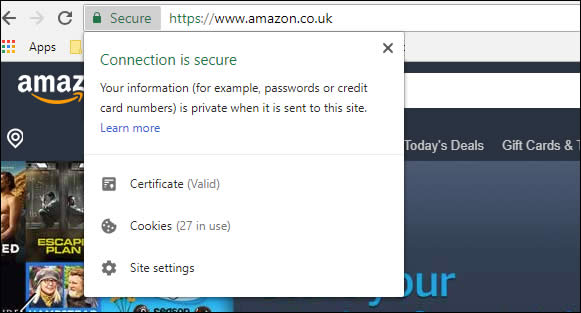
(Pictured: HTTPS, an extension of HTTP, that encrypts data
via either Transport Layer Security (TLS).
However, none of these early Internet based ecommerce technologies managed to gain widespread usage. The service that did, and popularised the Internet, was the World Wide Web. Created in the early 1990s, the web linked electronic documented together via hyperlinks and used Internet protocols, like the domain name system and tcp/ip, to locate these documents and transport them via HTTP. One of the early problems with commercialising the web was transporting payment information securely. In 1994, a scientist at Netscape Communications, named Taher Elgamal, helped develop an encryption security protocol called Secure Sockets Layer (SSL). HTTPS (HTTP over SSL) provided secure data communication, ensuring that a 'man in the middle' attack could not steal payment information, and made a commercial World Wide Web possible. Netscape implemented HTTPS in the Netscape Navigator web browser in 1994; the most popular web browser of the early World Wide Web.
(Netscape Navigator wasn't the first web browser, earlier browsers included: WorldWideWeb browser, MacWWW, Line Mode Browser, Lynx, ViolaWWW, MidasWWW, Cello, Erwise and NCSA Mosaic. Netscape Navigator 1 evolved from NCSA Mosaic and Mosaic Netscape. Secure Sockets Layer (SSL) is now known as Transport Layer Security (TLS), and HTTPS is provided as standard for the majority of web traffic)
The launch of HTTPS (1994) saw the creation of the Internet's biggest ecommerce websites a year later: Amazon.com and eBay.com. Some other early ecommerce websites include: IndiaMART (1995); ECPlaza (1996); HomeGrocer (1997); Zappos (1999), and Alibaba (1999). The early ecommerce success stories were typically startup companies and the majority were located in California's Silicon Valley. Located south of the San Francisco Bay Area, Silicon Valley includes the following cities/towns: Sunnyvale, Stanford, Santa Clara, Los Altos, Redwood City, Mountain View, San Jose, Palo Alto, Loyola, Menlo Park, Burbank and Cupertino. While London's tech entrepreneurs managed to secure £11bn of funding in 2020, there is a general acknowledgment that Europe did not invest enough into emerging technologies during the 1990s. The tech boom of the 90s was Americentric, with established bricks and mortar UK retailers slow to launch online services, and no UK startups to rival the likes of eBay or Amazon. Throughout the 2000s online shopping saw an exponential year-on-year growth, and it helped propel two of its earliest adopters (Amazon and Ebay) into unrivaled gargantuan global companies; Jeff Bezos, the founder of Amazon, is currently one of the World's richest individuals. While it's obvious who the early dotcom winners are, many startups failed, such as: Boo.com, Webvan.com, Razorfish.com, Broadcast.com, Kozmo.com, and Pets.com.
The early development of e-commerce also coincided with a stock market bubble that is referred to as the dot-com bubble. Sometimes called the "high-tech bubble", it was a speculative bubble that lasted from 1997-2000, and helped fuel a rapid expansion of the Internet. Excess amounts of liquidity from the Federal Reserve (U.S.), designed to protect against the Y2K bug, resulted in record investment in technology companies listed on the Nasdaq, most of whom operated at a loss, but with the assumption, that with time, their market share would equate to long-term profitability. Between 1995-2001, the NASDAQ Composite index climbed from 1000 points to over 5000 points, and when the dot-com bubble burst in 2002, the index crashed back to nearly 1000 points. Some of the acknowledged causes of the dot-com include: cheap money, complete speculation and over-confidence. The majority of dot-com companies -- publicly traded on the NASDAQ Composite from 1995-2000 -- collapsed, and included: theGlobe.com, eXcite.com, Ritmoteca.com, DEN.com, Flooz.com, and eToys.com. The dot-com bubble resulted in a loss of trillions of dollars in market capitalization, but it has been speculated that the investment did trickle down to build the backbone of the Internet, its servers and software.
Payment options for online transactionsOnline payment transactions involve a payer and a payee, with the payer (customer) making a payment to the party who is providing the goods or services, typically referred to as a payee (retailer). It is the decision of the payee to decide upon which payment method they will accept for the goods or services they are selling.
While on the 'face of it' it may appear that there are only two parties involved in an online payment transaction, there are usually four: The bank / financial system that issues the payment and the bank / financial system that receives the payment. There is the potential for just the payee and payer to be involved in the transaction if they are bartering between themselves, but many bartering trades involve a third party bartering platform, such as: Home Exchange, Listia, Barter Quest, GoSwap.org, Barter Only, and CraigsList.
The most common payment method for online orders are credit cards and debit cards (Visa, Mastercard, Delta, Visa Electron, Maestro and American Express). Credit cards are probably the most popular method due to the Section 75 laws in the UK that protect customers if things go wrong. The drawback to credit cards are that not everyone is eligible for one (those with a poor credit history or with no credit history) and some credit cards do come with fees (annual membership fee, fee for foreign currency transactions, late payment fee).
Therefore, for payers unable or unwilling to use credit or debit cards, there
are alternative payment methods available:
1. Cryptocurrencies (Bitcoin, Ethereum, Litecoin, Cardano)
2. Digital Wallet (Paypal, Alipay, ApplePay, SamsungPay, AmazonPay,
GooglePay, Skrill, NETELLER, Stripe,)
3. Gift cards, Vouchers and e-Gift Cards (M&S, Asda,
Sainsbury's, Currys, Just Eat, B&Q, Argos, Matalan, Boots, Amazon, Topshop,
Clarks, Schuh, TKMax, Iceland, Debenhams, Asos, HMV)
4. Cash on delivery (COD), payment is made with banknotes when the
goods are delivered (United States dollar (USD), Euro (EUR), British pound
sterling (GBP), Australian dollar (AUD), Chinese yuan (CNY), Japanese yen
(JPY), Indian rupee (INR), Russian ruble (RUB), South African rand (ZAR),
Swiss franc (CHF), Brazilian real (BRL), Mexican peso (MXN), Thai baht (THB),
Turkish lira (TRY))
5. Wire Transfer (Torfx, Currencies Direct, Moneycorp, Ofx), Bank
Transfer (CHAPS, SWIFT and Bacs) using IBAN and BIC codes, and Postal
Orders (Royal Mail).
6. Prepaid payment methods (Store card, Prepaid debit cards)
7. Buy now, pay later schemes (Clearpay, Laybuy, Klarna), that spread
the cost of the purchase over weeks or months.
When an online transaction of good/services has been agreed, the payee will typically generate an invoice bill that will be sent to the email address of the payer. Invoice bills generally include the following information: date the order was placed; delivery option; delivery date; address the order will be sent to; selected payment method; order number; and value of the order.
Delivery of goods and servicesOnce a payment method has been agreed by a seller and a buyer, then the goods and services can be delivered.
Services: Due to the non-physical and intangible nature of services, many delivered across the Internet. One of the most popular services sold over the Internet are streaming services, such as: Netflix, BBC iPlayer and Disney+. If services cannot be delivered across the Internet, then the Internet will typically be used to take payment and arrange a suitable location and time to provide the service. The advent of superfast broadband (fibre-optic landline and 4G/5G mobile networks) and VoIP-based videotelephony services, like Skype, changed the way many businesses provided their services. Netflix were a DVD rental store but evolved into a video streaming service when Internet download speeds made it feasible. Examples of services provided across the Internet include: psychological counselling, computer programing, mentoring counselling, motivational counselling, speech therapist, photo and video editing, email services, podcasting, ghostwriting, tech support and event planning. Many online services are delivered immediately once the payment transaction has concluded: such as purchasing movies and games. If a service is provided across the Internet rarely is a delivery fee required, unlike for goods, because data bandwidth has already been paid to Internet service providers.
Goods: Due to the physical and tangible nature of goods they're typically distributed through the use of professional courier services. Popular goods sold online include: electrical appliances, electronics, mobile phones, food, computers, games consoles, furniture, clothes, shoes, jewellery, books, beauty products, pet supplies, groceries, diy tools and supplies, and toys.
Couriers: Some of the largest couriers in the UK are: Royal Mail, Royal Mail (signed for), FedEx, Parcelforce, DPD, Yodel, UPS, Hermes, myHermes, DHL, UKMail, DX Delivered Exactly, Landmark, Fastway, Menzies, EDS, United States Postal Service (USPS), InPost and TNT. Not all the previously mentioned couriers provide the following but most do: domestic delivery, international delivery, drop shop, full package tracking and recorded delivery. How large are some of these courier networks? UKMail, for example, currently have a network of over 2400 vehicles at over 45 sites. Some couriers target specific areas: Menzies, for example, is a courier service for the Scottish Highlands, Islands and Argyll. Many retail chains have their own in-house courier service, using their own vehicles and employing delivery drivers. The largest businesses that do this are supermarkets, such as: Tesco, Sainsbury's, Morrisons, Asda, Waitrose, Ocado and Iceland. Some department stores use their own couriers, such as: John Lewis, Harrods and Selfridges. Sellers of electrical appliances often employ their own drivers due to the need of installing the goods as well as delivering them, some examples include: Currys and AO.
Drop Shops: Also referred to as: drop off points, parcel shops, and drop off locations. Drop shops, as the named would suggest, are shops where parcels can be sent, collected and returned. One of the biggest drawbacks to shopping online is that most deliveries are made during the daytime and on weekdays, typically when people are not home due to work commitments. Drop shops solve the issue of people not being home when deliveries are made. Most the major couriers -- such as Hermes -- have a nationwide network of drop shops, but not all couriers provide the service. The couriers which do have a drop shop network do tend to use different businesses. The most common businesses that are drop shops tend to be newsagents and convenience stores. Drop shops usually include a print device, where customers can print labels within seconds using a QR code or entering a reference number. Not every kind of item can be sent from drop shops, items that are prohibited tend to be: lithium batteries, fragrances, solvents and liquids.
Delivery Fees: The delivery of physical goods usually incurs a fee, but a sizable percentage of retailers do provide free delivery (some critics may argue that free delivery services are not free, as the delivery fee is simple added to the price of the goods). When sellers do apply a delivery fee it usually ranges from £4 to £10. Some bulk items, such as large white appliances and furniture, can incur a larger delivery fee.
Delivery Speed: The speed of delivery depends on the types of goods and the distance between the seller and buyer. Most goods will be delivered within 4-6 working days. Next day delivery is provided by many sellers, but usually requires the order to be made before a specific cutoff time, such as 4pm-6pm. Same day delivery is available but is less common, and usually requires the seller to have a physical location very close to the buyer. The most obvious example of same day delivery is food delivery platforms -- like Uber Eats, Deliveroo and Just Eat -- who can arrange for delivery from food outlets situated within a local radius (1-4 miles).
ConclusionsOnline shopping sales are continuing to grow: Alibaba doubled its single day sales record in 2016 and Amazon's UK sales soared by 50% in 2020. The worldwide health concerns of 2020-2021 has further increased the shift towards online shopping and a more digital world: Due to the advantage online shopping has for hygiene. But it has come at a cost: Many high streets in the UK now contain empty shops, and those who rely on them, often the elderly, suffer as a result. Lots of chainstores can directly link their demise to the launch of ecommerce: Blockbuster, Woolworths, HMV, and Toys R Us. The impact upon 'mom and pop' family run stores, while harder to ascertain, has probably been just as severe. While online shopping has been lauded for its convenience and price saving (such as price comparison and cashback sites), it is not without criticism, such as: Bricks and mortar retailers complaining about shoppers checking products instore and then buying online at a discount; Overworked warehouse workers for online retailers; Large international online businesses paying a low amount of national tax; and fake sellers on large auction websites.